 Ink Lifterv1.1.0 · Windows 10 and 11 · or in your browser
Turn a phone photo of your signature into a clean, transparent PNG.
Lift signatures, stamps and handwriting off a photo of paper, onto a transparent background.
Free, with every update. No licence key, no account, no ads.
Free, nothing lockedNo subscriptionNo accountWorks offline
No Windows computer? Use Ink Lifter in your browser, on any phone or computer. Your files stay on your device.
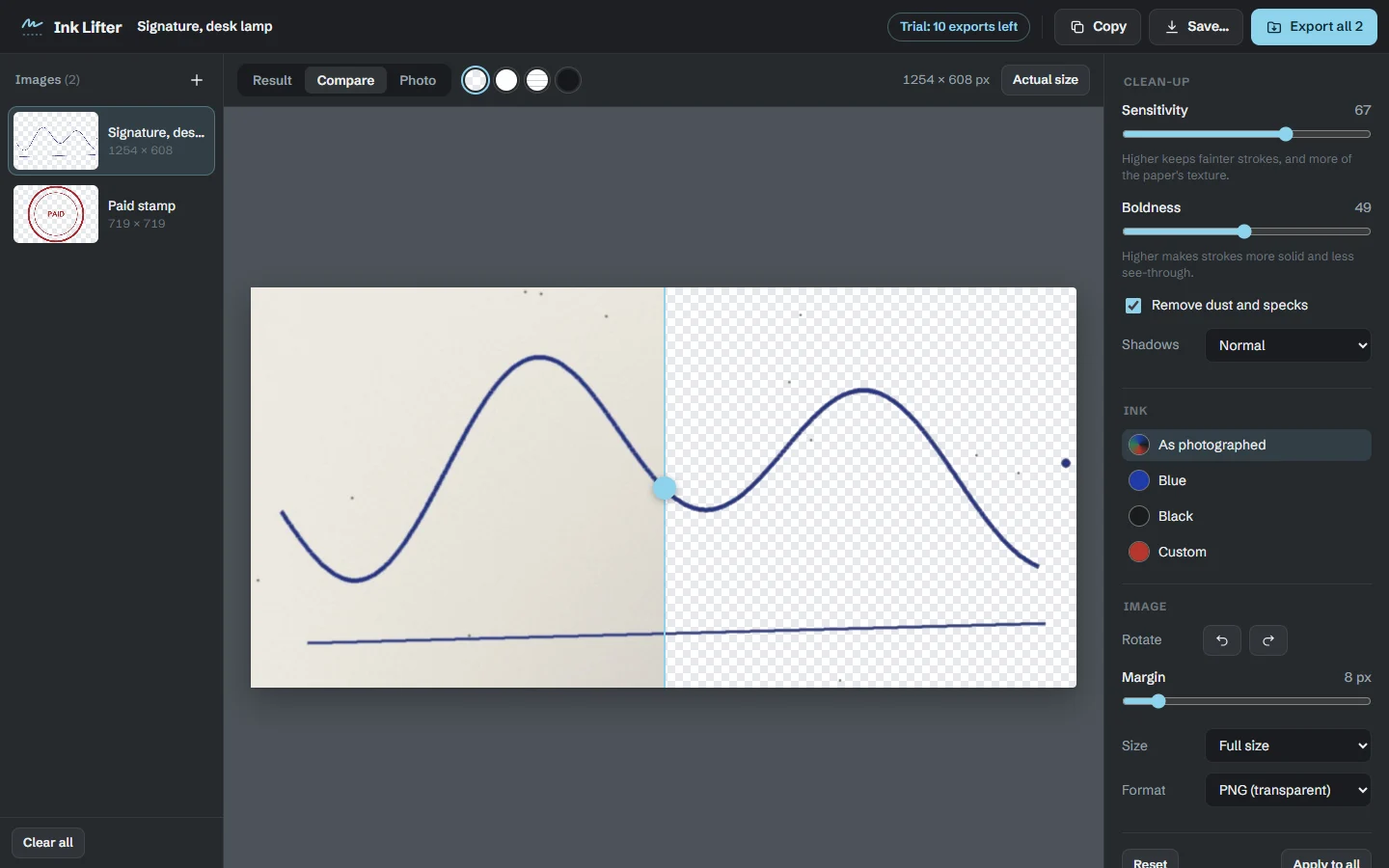
Snap your signature, a company stamp or a hand-drawn sketch with your phone, and Ink Lifter turns it into a clean transparent PNG you can drop into a document, a slide or a website. It reads the paper around every stroke, so desk-lamp shadows and grey phone-camera "white" vanish while the ink keeps its soft edges. It all happens on your computer: a photo of your signature is the last thing you should upload to a stranger.
The problem
Why a photo of ink never looks right
Grey paper, not white
Phone cameras turn white paper grey, and a desk lamp throws shadows across it.
Cut-outs that break the strokes
Background removers are made for people and products, so thin pen lines break up or vanish.
Your signature, uploaded
Most online tools do the work on their servers, with a copy of your signature.
How it works
Photo to PNG in three steps
Snap it
Take a photo of the signature, stamp or sketch, and drop it in or paste it.
Lift it
The paper, shadows and specks go; the ink stays, soft edges and all. Adjust the strength and colour if you like.
Use it
Save a transparent PNG or WebP, or copy it straight into a document.
Everything included
Everything Ink Lifter does
One photo or a batch
Drop them in, or paste straight from the clipboard.
Shadows disappear
Each stroke is judged against the paper around it, so shadows and uneven light go.
Any ink colour
Keep the ink’s own colour, or repaint it blue, black or anything else.
Faint pencil to heavy marker
Sensitivity and boldness sliders for every kind of stroke.
Clean edges
Removes dust and specks, and crops to the ink with the margin you choose.
See before you save
Before-and-after compare, and previews on transparency, white, a page or dark.
Transparent PNG or WebP
Save, copy, or export everything to a folder at once.
Your files never leave your device.
- Your photos are processed on your computer. They are never uploaded.
- No account, no sign-in, no cloud. It works with the internet unplugged.
- Nothing is kept: images exist only until you close the window or save them.
Price
Free, with nothing held back
Ink Lifter
Free
No licence key, no account, no ads. Nothing is locked.
- One photo or a batch
- Shadows disappear
- Any ink colour
- Faint pencil to heavy marker
- Clean edges
- See before you save
- Transparent PNG or WebP
- Every future version
- The Windows app and the browser version
- Works with the internet switched off
Questions
Before you download
How can I check that it really doesn’t send my files anywhere?
Unplug your network cable or turn off wifi: Ink Lifter works exactly the same. For a closer look, open Windows’ Resource Monitor while you use it. Its only connections are to 127.0.0.1, your own computer. In the browser version, open it once, then turn on airplane mode: you can still open photos, clean them up and save them, because it all happens on your phone or computer.
Can I use it on my phone?
Yes. Open Ink Lifter in your phone’s browser. It works on Android and iPhone, with nothing to install; your browser can add it to your home screen if you like. On a phone, Share sends the result straight to WhatsApp, email or anywhere else. Nothing is kept in that browser: your photos exist only until you close the page or save them.
Is it really free?
Yes. Every feature works, with no licence key, no trial, no watermark and no ads, and there’s no account to sign up for. It used to be sold; now it’s simply free.
Windows says “Windows protected your PC”. Is it safe?
Yes. The installer sets Ink Lifter up just for you, with no administrator password. Because it comes from a small independent developer, Windows may show that blue box the first time: click More info, then Run anyway. Windows shows it for new programs it hasn’t seen many times before, not because anything is wrong with the file.
Do I get updates?
Yes. Every new version of Ink Lifter is free too. Download it from this page and install it over the old one; your files carry on. The browser version updates itself.
Mac or Linux?
The app you install is for Windows, but the browser version runs on a Mac or Linux too.
Ready to lift your first signature?
Free, with nothing to unlock.